Create your personal WiFi Network
Today, I am going to tell you about a software through which you can create a WiFi network of your own. To do that you got to have the following items.
20 Bangla ebooks to learn about computer easily
It is very much essential for an user to learn the basics of computers. Today, I am going to tell you about a bangla ebook site from where you can download different bangla books and you will be able learn different aspects of computer easily.
Download Internet Download Manager (IDM) Full Version for Free
Internet Download Manager shortly known as IDM is one of the most favourite software to all the Internet users. But, the fact is, it is not free. That's why, many of us are worried where to find the free version. I personally search so many site to download the portable version. Atlast, I have got one.
Popular Wordpress Tutorials: Part 1
Now a days Wordpress has become very popular for website developing. Most website developers are now using wordpress because with wordpress you can build any sort of website easily.
Connect Your Website with Facebook Fanpage
Now a day Facebook has become a great source of increasing traffic of your blog. That's why most of the blogger open a facebook fanpage to drag users from facebook. But, the fact is, most of us don’t know the procedure of how to connect this fanpage with his/her website.
Keyboard Shortcuts of your computer
These are the keyboard shortcuts of your computer through which you can use your computer easily.
Methods for passing oDesk Readiness Test Easily
Today’s post is regarding passing the oDesk readiness test. After registering at oDesk as a freelance contractor he/she has the access of only 2 bid opportunity in a month. But when you pass the Readiness Test your bid opportunity will increase up to 10 to 20 times.
Some Easiest ways of Earning Money Online (Part: 1)
Easy way to Make Money Online
Download 31 Days to Build a Better Blog free
Download 31 Days to Build a Better Blog written by Darren Rowse free. It is an Unique ebook to build a better blog. Try it now. Just Click here.
Methods for passing oDesk Readiness Test Easily
Connect Your Website with Facebook Fanpage
3.Tick mark on the “Posting Preferences” option (If there is no tick mark) and then click on the “Save Changes” Button.
11. Now insert the URL of your site on the following options: “Feed URL” & “Source URL”.
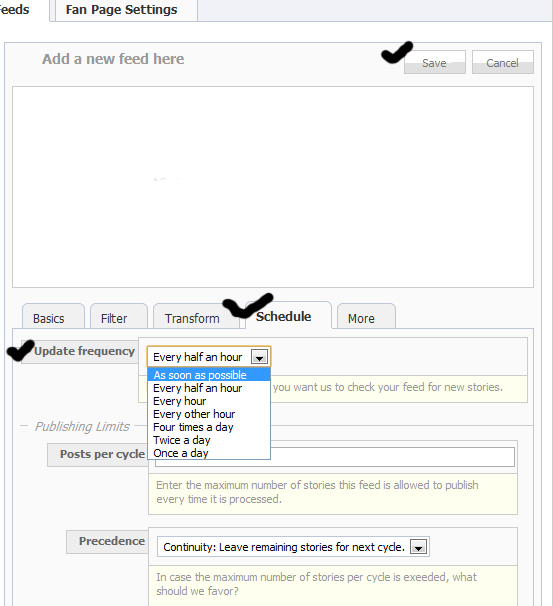
13. Click on the “Schedule button” and determine your update frequency (How many times RSS should visit your site)
Popular Wordpress Tutorials: Part 3
Popular Wordpress Tutorials: Part 2
Popular Wordpress Tutorials: Part 1
Add Ajax Recommended Post Slide out Widget in Blogger
Demo of the Slide Out
Add the Recommended Post Slide out Widget
Customizing the Recommended Slide out
<div class='post-footer-line post-footer-line-1'>
<p class='post-footer-line post-footer-line-1'>
<data:post.body/>
<b:if cond='data:blog.pageType == "item"'> <div style='display:none' id='bpslidein_place_holder'></div> </b:if>
Add a Related Post widget after every post in Blogger
- Go to Layout >Edit HTML in your Blogger Dashboard.
- Back up your existing Template before making any changes!
- Make sure to check the "Expand Widget Templates" box.
- Search for the </head> tag.
- Add the following code just before the </head> tag.
- Now search for <data:post.body/>. In some of the templates this code may look like this
<div class='post-body>
or
<data:post.body/> - Add the following code just beneath the code you just searched for.
<b:if cond='data:blog.pageType == "item"'>
<div id="related-posts">
<font face='Arial' size='3'><b>Related Posts : </b></font><font color='#FFFFFF'><b:loop values='data:post.labels' var='label'><data:label.name/><b:if cond='data:label.isLast != "true"'>,</b:if><b:if cond='data:blog.pageType == "item"'>
<script expr:src='"/feeds/posts/default/-/" + data:label.name + "?alt=json-in-script&callback=related_results_labels&max-results=5"' type='text/javascript'/></b:if></b:loop> </font>
<script type='text/javascript'> removeRelatedDuplicates(); printRelatedLabels();
</script>
</div></b:if> - Now Save your Template.
<style> #related-posts { float : left; width : 540px; margin-top:20px; margin-left : 5px; margin-bottom:20px; font : 11px Verdana; margin-bottom:10px; } #related-posts .widget { list-style-type : none; margin : 5px 0 5px 0; padding : 0; } #related-posts .widget h2, #related-posts h2 { font-size : 20px; font-weight : normal; margin : 5px 7px 0; padding : 0 0 5px; } #related-posts a { text-decoration : none; } #related-posts a:hover { text-decoration : none; } #related-posts ul { border : medium none; margin : 10px; padding : 0; } #related-posts ul li { display : block; background : url("https://blogger.googleusercontent.com/img/b/R29vZ2xl/AVvXsEg74TpRsAXqPp2n1W0T36koNR40WBGjV-sW7_3OmJodlrCYUEKu0eklM_6YsBpEgccxK5wkyGnDAxgQJMUhVR822TvySD1Fy8tCoc37k__KiFRsKmbxxgpbqoCLyUhyphenhyphenKaHHUBLQlCm3m10/") no-repeat 0 0; margin : 0; padding-top : 0; padding-right : 0; padding-bottom : 1px; padding-left : 21px; margin-bottom : 5px; line-height : 2em; border-bottom:1px dotted #cccccc; } </style> <script src='http://theblogtemplates.com/scripts/Related_posts_hack.js' type='text/javascript'/>


Saturday, January 21, 2012